Currently Using BBB? Here is What You Need to Know

If you have used BigBlueButton (BBB) for recordings in your courses, please ensure you archive your content.
All recordings must be transferred to Kaltura before BBB is decommissioned on April 24, 2026.
Zoom-Moodle Integration

Instructors can create Zoom meetings directly from their Moodle course page. Click here for step-by-step instructions.
- All Zoom sessions will automatically appear in the Moodle calendar.
- Students can see upcoming meetings and join Zoom links from Moodle. If you want to share instructions with your students on how to join Zoom meetings from Moodle, please share this link.
- Cloud recordings show up automatically in the course within an hour after the meeting ends.

To support KPU's commitment to accessibility, be sure to enable auto-captions by following these steps.
Make the most of Zoom for teaching, office hours, one-on-one meetings, and group work. Click the buttons below for tips on setting up and designing these Zoom sessions.
Zoom Sessions for Instruction.
Click the links below for step-by-step instructions on how to use these common Zoom features.
Helpful Considerations Using Zoom for Teaching
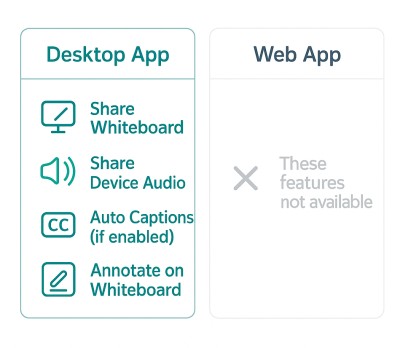
Using the Zoom Desktop Application
- We recommend the Zoom Desktop app for teaching and instructional activities.
- The browser version supports basic participation but lacks features like saving chat, shared whiteboards, shared notes, automatic captions, and full host controls.
- All KPU-managed devices will have the Zoom Desktop app installed by the start of the Fall 2025 semester.
Zoom Pro License for Faculty
- Faculty accounts receive a Zoom Pro license automatically once you login via SSO—no request needed.
- Pro license includes unlimited meeting duration, recording, co-hosting, breakout rooms, polling, and more.
- If you are missing any features, please contact us via the Teaching and Learning Support Portal
Frequently Asked Questions

1. Do I need to create a Zoom account to use it in Moodle?
No. You do not need to create a new Zoom account. Zoom is integrated with KPU’s Single Sign-On (SSO), so you can log in using your KPU credentials.
2. When is BigBlueButton (BBB) being phased out?
BBB will remain available until the end of Spring 2026. The transition to Zoom begins in Fall 2025.
3. Where is Zoom data stored?
Zoom’s Canadian data residency feature ensures data is stored in Canada.
Support and Resources
Click here to submit a support ticket.
Click here to view Zoom supported articles.
If you are unsure about how to submit a support ticket, view instructions here.